
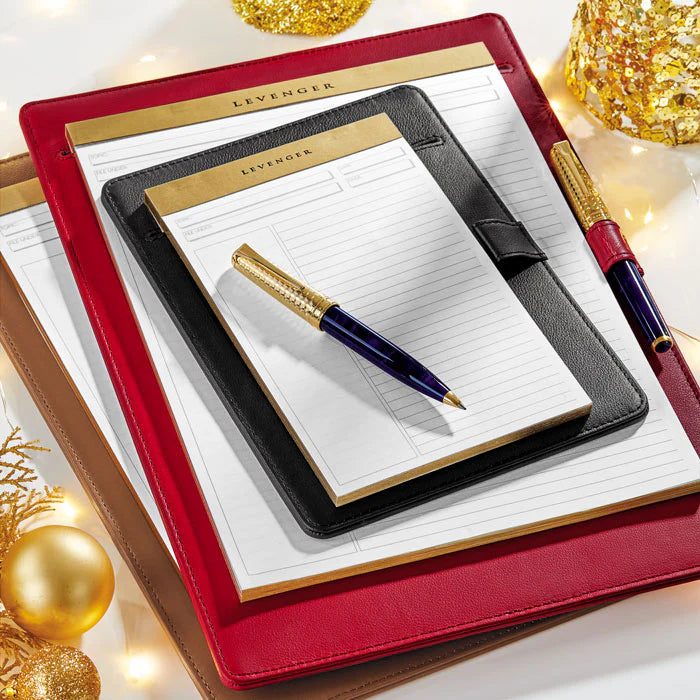
If you’re ready to think deeply without the tug of tabs and pings, a simple analog kit can make focus feel calm and repeatable. You’ll use three tools: a Circa notebook for structured work, a Freeleaf pad for quick capture and scratch thinking, and a silent timer to contain the block. Set it up once, and you can run the same ritual anywhere—at home, in a quiet office, or at a university library in the United States.
Why this analog trio works
- One home for the work: Circa’s discbound format lets you rearrange pages, add project sections, and archive cleanly, so ideas don’t scatter.
- A runway for thinking: A Freeleaf pad sits beside your notebook for quick math, sketches, and mid‑idea detours—so your main notes stay crisp while your mind explores.
- Clear edges in time: A simple, non‑digital timer gives your block a beginning and an end, encouraging intensity and protecting a restorative break without inviting apps or alerts.
Choose your tools
1) Your Circa setup
Start with a ready‑to‑work build if you’re new to discbound. The compact path is straightforward and cost‑effective: the Circa Starter Kit gives you the core mechanics without overcommitting, while the Circa Simply Irresistible Kit adds tactile upgrades for those who prefer a more substantial in‑hand feel. If your work is diagram‑ or spec‑heavy, the Circa L‑Tech Engineer Notebook Bundle pairs structured paper with a durable cover for regular field use. For an elegant, meeting‑ready configuration that carries pads, cards, and pen, the Circa Classic Softfolio Journal Bundle keeps everything contained. Circa’s flexibility—sizes, discs, covers, refills—makes it easy to tailor the notebook to one project or many.
2) A Freeleaf pad at your elbow
Keep a Freeleaf Annotation Ruled Pad on your dominant‑hand side as an “auxiliary brain.” Its smooth, fountain‑pen‑friendly stock and Cornell‑style margin make it ideal for callouts, decisions, and action flags while you keep your primary notes clean. If you like a firm base and portability, consider the Chief Engineer Pad & Backer Bundle to stabilize the pad wherever you work.
3) A screen‑free timer
Any quiet, visible timer works—mechanical dial, analog flip, or a sand hourglass. The critical features are silence (no ticking), a face you can see at a glance, and a duration that matches your block plan. Avoid using your phone; airplane mode still tempts most of us to “just check.”
Timer options at a glance
Match your personality and space with a simple decision matrix.
| Timer type | Best for | Pros | Tradeoffs |
|---|---|---|---|
| Silent analog dial | Most office desks | Quick to set, easy glance feedback | Requires battery; choose a non‑ticking model |
| Mechanical wind‑up | Home office, studio | No batteries, tactile start ritual | Some models tick; test before using in shared spaces |
| Hourglass (15–30–60 min) | Quiet libraries; shared tables | Completely silent, visually calming | Fixed duration; no audible end signal |
A face you can see without a screen
Lumos Clock — the point of the timer is that checking the time does not put you back in front of a notification — any silent clock in view will do.
Set up your screen‑free block (5 minutes)
- Pick your duration. Try 25 minutes for task bursts, 50 minutes for concentrated drafting, or 90 minutes for research and outlining. Use one number consistently for a week to build the habit.
- Prepare your pages. In Circa, create today’s working spread: left page for plan, right page for live notes. Keep project dividers simple—one per active workstream.
- Open the runway. Place your Freeleaf pad to the side for calculations, quotes, and doodles. Anything messy goes here; actionable items get a star and later migrate to Circa.
- Set the timer and state your aim. Write a one‑sentence objective at the top of the Circa page: “Draft section two” or “Prove the cost model.” Then start the timer.
- Work only the plan. If a thought pops in that’s off‑plan, capture it on Freeleaf and return immediately. Your future self will process it after the bell.
- Close with a two‑line review. When time’s up, jot: What moved? What’s next? Then either take a purposeful break or queue up another block.
- Freeleaf Dot Grid Pads (set of 5) — The capture pad that catches off-plan thoughts so they stop interrupting.
- Circa Keeping Tabs Discbound Sticky Notes (set of 2) — Marks where the block ended, so the next one starts without re-reading.
Structure your time
- 25‑minute sprints: Useful for administrative stacks or moving a stubborn task out of “stuck.” Pair with a 3–5 minute reset. See tactical tips in Analog Sprinting.
- 50/10 sessions: Often right for drafting, reading, or modeling. Use the 10 to stretch, file notes, or set up the next block. The Circa Think‑List‑Plan Pad Trio is a straightforward support for daily/weekly layout.
- 90‑minute deep dives: Reserve for concept design or complex analysis. Keep the space quiet; stack two sessions only if the second has a distinct goal.
Make Circa fit your workstream
- One project, one section: Use discs and tab dividers to right‑size capacity. Switching disc sizes lets you grow or slim down a notebook without rewriting a page.
- Field work and diagrams: If you sketch systems or annotate specs, the gridded paper and sturdy cover of the Circa L‑Tech Engineer Notebook Bundle handle wear and precision well.
- Executive travel: If you carry into meetings, the Circa Classic Softfolio Journal Bundle adds pockets for cards and loose pages, keeping your kit professional and contained.
- Heavy note‑takers: Prefer to start fully outfitted? The Super Circa Bundle assembles a comprehensive setup so you can focus on the work rather than the build.
Keep it economical without compromise
Levenger builds for longevity—often worth the investment—and there are smart ways to save. Bundles typically cost less than piecemeal, seasonal promotions are frequent, and Levenger Rewards lets you earn points toward future purchases. As of July 27, 2026 in the U.S., program details show tiers and points you can redeem at checkout; see current terms before you plan a larger build.
Common pitfalls and simple fixes
- Phone creep: Leave it in another room. If you must keep it nearby for emergencies, place it face‑down and out of reach.
- Messy notes everywhere: Keep transient scribbles on Freeleaf; migrate only decisions and next actions into Circa at the end of the block.
- Unclear objectives: Start each block with a verb and a noun (“Draft executive overview,” “Validate step‑costs in model”).
- Paper overload: Archive weekly. Circa’s disc system makes it quick to move finished pages into an archive notebook.
Real‑world variations
- Campus study blocks: Pair a junior Circa with a Freeleaf pad and set up in the quiet zone. For ideas on environment, see Campus Detox.
- Team project rooms: Establish a phone‑off table, shared Freeleaf pad stack, and a physical timer everyone can see. For setup culture, read Phone‑Off Project Rooms.
- Weekend planning: If you prefer to plan your week offline, work from a monthly spread, then load actions into Circa for weekday blocks. See Weekend Reset.
- Morning focus: Use a short paper‑first routine to prime your first deep‑work block of the day. Ideas here: Analog Mornings.
- Habit scaffolding: Track how many blocks you run each week and celebrate streaks with small rewards. See Analog Habit Tracking.
- End‑of‑day shutdown: Close the loop so your next block starts clear. Try the steps in End‑of‑Day Reset.
Recommended kits to consider
- First build: Circa Starter Kit for a lean, affordable entry.
- Ready‑for‑anything setup: Super Circa Bundle if you prefer a full suite from day one.
- Engineer’s workflow: Circa L‑Tech Engineer Notebook Bundle when you sketch, grid, and annotate frequently.
- Pad‑forward thinkers: Chief Engineer Pad & Backer Bundle to pair with Freeleaf for rapid capture.
- Daily/weekly structure: Circa Think‑List‑Plan Pad Trio to map blocks across the week.
- Polished carry: Circa Classic Softfolio Journal Bundle for meetings and travel.
- Color‑forward elegance: Circa Royal Discbound Notebook Bundle if you want a refined, coordinated look on the desk.
- Writers’ days: If your deep work is words, the Novelist Bundle keeps drafting pages, edits, and scene cards together.
Frequently Asked Questions
How do I pick the right Circa size for deep work?
Letter is generous and ideal at a fixed desk; Junior is a strong everyday carry that still fits substantial notes; Compact is travel‑light but better when paired with a Freeleaf pad for overflow. Circa is available in multiple sizes and is easy to expand with larger discs later.
Do I need both a Circa notebook and a Freeleaf pad?
Using both keeps your primary notes legible and indexed (Circa) while giving your brain a separate scratch space (Freeleaf) for calculations, quotes, and ideas that don’t yet deserve a permanent home. It’s a small change that prevents cluttered project pages.
What timer length should I start with?
Pick one standard length (25, 50, or 90 minutes) and hold it for a week. Shorter blocks help when you’re resisting a task; longer blocks suit reading, drafting, or modeling. The specific number matters less than using it consistently.
Any tips for saving on a Circa build?
Look for curated bundles and consider joining Levenger Rewards to earn points toward future purchases; terms can change, so check current details before you buy.
Next steps
Tomorrow morning, try a single 50‑minute block with a clear objective and a Freeleaf pad beside your Circa. If you want a gentle on‑ramp, pair this guide with Analog Mornings. To extend the practice across your week, map blocks with the Circa Think‑List‑Plan Pad Trio and close the loop each evening with End‑of‑Day Reset.


