
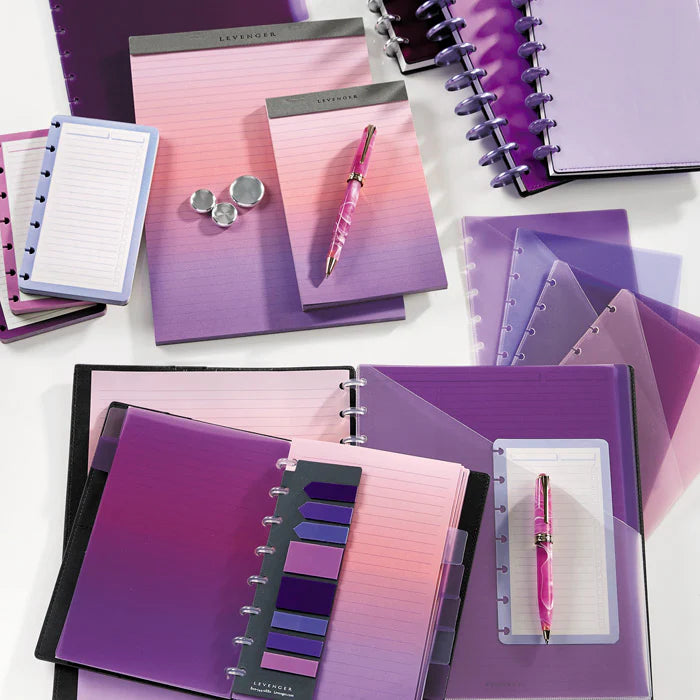
Whether you’re drafting a novel, synthesizing sources for a literature review, or running a cross‑functional sprint, the winning setup is one you’ll actually use. Below are practical ways to combine index cards, tab dividers, and portable project boards—plus specific Circa refills and accessories—to move from capture to completion with less friction.
Which format fits your work?
Use this decision matrix to choose a starting point. Many readers blend two or all three.
| Format | Best for | Strengths | Tradeoffs | Portability |
|---|---|---|---|---|
| Index cards | Idea generation, quotes, scenes, tasks | Ultra‑flexible; easy to sort and resequence; tactile focus | Easy to misplace without a holder; limited surface per card | Excellent in a holder or band |
| Tabbed Circa notebook | Research binders, class notes, meeting logs | All in one place; pages move on discs; clear wayfinding with tabs | Less wall‑visible than a board; capacity depends on disc size | Great—throw in a bag |
| Project board (card stand) | Outlining, timelines, sprint boards, presentations | At‑a‑glance view; great for collaboration and sequence | Lives on a desk or shelf; not ideal on the go | Stationary |
Index cards for capture, cluster, and sequence
Cards free your thinking from linear pages. Capture one idea per card, cluster related cards, then sequence your storyline or argument. The tactile act of moving a single thought invites sharper edits and cleaner logic.
Pro tips
- One thought per card: Phrase it as a verb + object (for example, “Validate assumptions with 10 interviews”).
- Make clusters visible: Use a low‑profile stand or “bleachers” so themes stay in view while you write or code data.
- Tag the corner: Add a tiny code (A1, A2) to re‑home cards after a working session.
Tabbed research notebooks that stay flexible
When your project demands continuity—sources, notes, drafts, and actions—build a tabbed Circa notebook. Dividers create reliable “homes,” while Circa pages still move anywhere on the discs.
Recommended building blocks
- Sectioning with clear wayfinding: Choose sturdy color‑coded tabs to separate research phases or course modules. For a classic look, see Circa Life Works Discbound Notebook Dividers; for high‑visibility color coding, try Circa Wafer Discbound Notebook Dividers (set of 8) or the pastel palette in Circa Vibrant Life Works Discbound Notebook Dividers.
- Fast navigation mid‑meeting: Drop in Circa Page Finder Discbound Notebook Tabs so today’s section opens instantly.
- Loose pages and handouts: Stash packets or small card stacks inside Circa Wafer Discbound Notebook Pocket Dividers or opt for a minimal look with Circa Clear Discbound Notebook Dividers.
- Paper tuned for synthesis: Mix structured planning with freeform notes: the Circa Project Planner Discbound Refill helps translate clusters into milestones, while 300 Circa Annotation 1/4" Ruled Discbound Refill gives you a generous note margin for sources, tags, or to‑dos. If you’re choosing paper types for pens you already love, see Paper That Performs: Choosing Refills for Notes, Projects, Meetings, and Study and the hands‑on Paper Performance Lab.
Suggested sections
- 01 Sources: citations, key quotes, and abstracts.
- 02 Outline: working structure derived from your card clusters.
- 03 Drafts: successive versions with dated page‑finder tabs.
- 04 Tasks: next actions and dependencies from your planner pages.
- Circa Wafer Discbound Notebook Dividers (set of 8) — High-visibility wafer tabs organize research phases and make sections easy to find in low light.
- Circa Page Finder Discbound Notebook Tabs (set of 4) — Page finder tabs let you mark and jump to active sections during meetings.
- Circa Clear Discbound Notebook Dividers (set of 5) — Clear tab dividers provide durable sectioning while keeping content visible.
- Circa Project Planner Discbound Refill (100 sheets) — Project planner refill supplies structured pages for tracking tasks and research actions.
- Circa Annotation 1/4" Ruled Discbound Refill (300 sheets) — Annotation ruled refill offers lined pages suited to sustained research notes and drafts.
- Circa Annotation Ruled Discbound Notebook — A ruled Circa notebook gives a ready set of movable pages for long-form notes and synthesis.
Make a portable project board with Circa
Prefer a storyboard you can carry? Build a “book‑board” you can fan open on a table, then fold for travel.
- Choose durable discs: Larger, solid discs give you room to add and reshuffle pages. For a refined, long‑wear choice, consider Matte Aluminum Circa 1" Notebook Discs; pair with sturdy covers and you’ve got a compact board that handles frequent rearranging. For capacity and feel comparisons, see Discs Demystified and upgrade scenarios in Common Upgrades.
- Use pocket tabs as lanes: Insert 3–5 pocket dividers as lanes (Backlog, Doing, Review, Done) and drop cards or cut sheets into each pocket.
- Mount “cards” on paper: Tape or glue cards onto annotation sheets so you can mark patterns beneath each idea.
- Plan sprints: Slot a weekly sprint or chapter plan onto the first page using the Circa Project Planner Refill you already placed up front.
- Matte Aluminum Circa 1" Notebook Discs (set of 11) — A portable, durable storyboard/project board you can fan open and fold for travel, with sturdy discs and covers.
- Circa Storyboard Refill (100 sheets) — Storyboard refill provides pre-formatted sheets you can fan out as lanes for a portable board.
- Circa Translucent Discbound Notebook Covers (set of 2) — Translucent covers protect pages while keeping the board lightweight and foldable for travel.
- Circa Discbound Notebook Sheet Protectors (set of 5) — Sheet protectors let you drop cards or printed assets into lanes without losing them.
Color, clarity, and accessibility
Color is a powerful retrieval cue. Use a consistent scheme across cards, tabs, and board lanes—warm colors for content, cool colors for logistics, for example. The pastel set in Vibrant Life Works Dividers makes section boundaries visible even in dim meeting rooms. For hand comfort, left‑handed page turns, and legible layouts, explore Accessibility & Ergonomics: Weight, Balance, Left‑Handed Tips, and Page Layouts.
- Circa Modern Discbound Notebook Dividers (set of 8) — Modern discbound tab dividers give bold color blocks for clear section boundaries.
- Circa Sea and Sky Discbound Notebook Dividers (set of 8) — Sea and Sky dividers use distinct hues to create an accessible color-coded scheme.
- Circa Midway Clear Tab Dividers — Midway clear tab dividers provide high-contrast labels while keeping layouts legible.
- Circa Modern Discbound Notebook Pocket Dividers (set of 4) — Modern pocket dividers create tactile lanes and store tactile aids for diverse accessibility needs.
Right size, right capacity
If you travel often, a junior notebook is compact without feeling cramped; desk‑first readers often prefer letter. To set yours up quickly, start with Start Here: Build Your First Circa in 10 Minutes and compare footprints in Circa Sizes Explained: Jotlet, Compact, Junior, Midway, Letter—Which Fits Your Day?. For growing projects—or a move from plastic to aluminum—see Common Upgrades.
- Circa Discbound Notebook Starter Kit — A starter kit helps you test sizes and components to find the right Circa footprint for travel.
- Circa Midway Annotation Notebook — Midway annotation notebook is the balanced size for desk work with enough space for project notes.
Team workflows and meeting outcomes
Cards shine in workshops—think affinity mapping or naming sprints—while a tabbed project book captures decisions and next actions. If you run recurring meetings, the agenda templates and refill suggestions in Meeting Mastery can help you standardize outcomes. Leaders rolling out a shared kit across a department will find templates and setup tips in Circa for Teams.
- Circa Workweek Planner Refill — Workweek planner refill supports recurring meeting agendas and weekly outcomes for teams.
- Circa Let's Recap Refill (50 sheets) — Let's Recap refill provides a concise template for meeting summaries and next actions.
- Circa Start-Anytime Visions smartPlanner Agenda Refill — Start-Anytime Visions agenda refill supplies a structured agenda format teams can standardize.
Keep momentum: maintenance and archiving
- Monthly refresh: Cull old cards, rebuild sections, and archive completed phases. See Maintenance & Refresh for a light calendar.
- Turn handouts into movable pages: Use a punch to add workshop outputs, diagrams, or checklists—see The Circa Punch Playbook.
- Bridge analog and digital: Scan cards you’re worried about losing and tag them in your notes app. For balanced hybrid habits, explore Digital + Analog Harmony.
Quick setups for U.S. offices, studios, and campuses
- Desk‑based researchers (U.S. university labs or libraries): Index‑card board for hypotheses and a letter Circa for protocols and results. Add Page Finder Tabs for today’s log.
- Creative directors in NYC/LA studios: Color‑coded tabbed book for stakeholders and timelines; portable “book‑board” for sequencing campaigns. Consider aluminum discs if you rebuild often.
- Consultants on the road across the U.S.: Junior Circa with Project Planner pages in front, plus one pocket divider as a receipts lane.
- Students and lifelong learners: Card‑based reading notes plus a tabbed class binder. See Setups for Students & Lifelong Learners and a meeting‑ready pattern in Setups for Work.
Value notes: thoughtful tools, smart spending
Levenger designs are built for daily use and rebuilds—often the more cost‑effective choice over a project’s lifespan. You’ll also find periodic offers, Circa refills sold in efficient pack sizes, and a loyalty program that quietly rewards the work you do every day. To assemble a kit that fits your workflow and budget, see Build Your Own Bundle: How to Maximize Savings Without Sacrificing Fit.
- Circa Simply Irresistible Discbound Notebook Sampling Kit — The sampling kit helps you evaluate materials and sizes before committing to a long-term choice.
- Bomber Jacket Circa Discbound Notebook — A bomber-jacket folio is a durable cover option built to last through heavy daily use.
- 2027 Circa smartPlanner Notebook Bundle — The 2027 smartPlanner bundle bundles refills and covers for cost-effective, long-term planning.
Next steps
Pick one format to pilot this week, then add the complementary pieces once you’ve validated what helps you think and ship. If goals and habits are part of your project, you may also like Circa for Goal Setting: Quarterly Reviews and Habit Tracking with Refill Mixes. For airport‑proof travel setups, see Circa for Travel: Airport‑Proof Kits, Security Tips, and Packing Lists, and for modular mobility ideas try Circa On the Go: Softolio, Folios, and Bags—Modular Mobility Without the Bulk. If anything feels off, you can troubleshoot quickly with Troubleshooting: Disc Snag, Page Wear, Punch Alignment, and Quick Fixes.
Frequently Asked Questions
How do I choose between junior and letter sizes for a project notebook?
Match the size to where you’ll work most. If you’re commuting or moving between U.S. meeting rooms, junior balances portability with space. If your desk is home base or you annotate printouts, letter offers full‑page comfort. For exact dimensions and disc counts, see Circa Sizes Explained.
Which discs should I start with, and when should I upgrade?
Start with discs that hold your current project plus 20–30% headroom. If you’re rearranging pages frequently or carrying a board‑style build, aluminum provides durability and a smooth turn. Compare options in Discs Demystified and see typical upgrade paths in Common Upgrades.
What paper works best for research notes and meeting follow‑ups?
Use structured planning sheets to capture dependencies, then continue on annotation‑ruled pages for sources and actions. A practical pairing is Circa Project Planner Discbound Refill followed by 300 Circa Annotation 1/4" Ruled Discbound Refill. For fountain‑pen behavior and grid or dot‑grid options, see Paper That Performs.
How do I keep teams aligned if we mix analog and digital?
Agree on capture rules (one idea per card, action verbs), make outcomes visible in a shared project book, and scan/share only the pages that matter. The practices in Digital + Analog Harmony help you build a reliable bridge—especially useful for distributed U.S. teams.


